
 Screenshot Bin · iPhone app
Your pile of screenshots,
sorted into three bins.
Screenshot Bin reads the text in your screenshots on your iPhone and sorts them into likely to delete, keep, and unsorted. Clear out the captures you are done with at once, and see the dates hidden in the ones you keep.
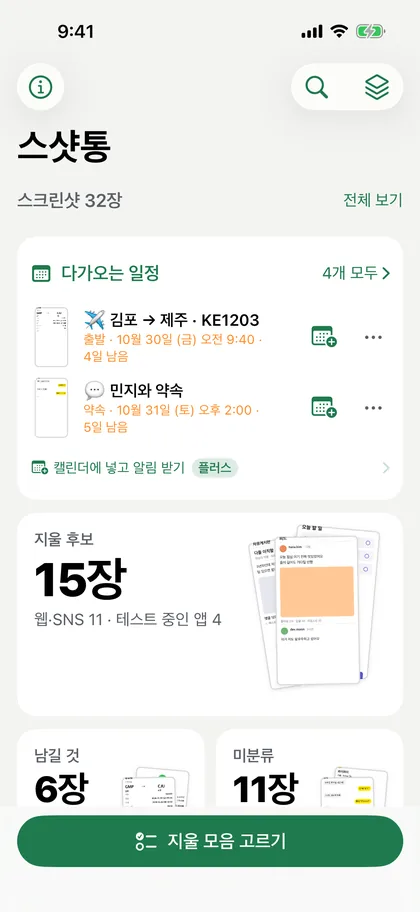
Three bins, sorted for you
Likely to delete
Screens you looked at and moved on from: community posts, social feeds, YouTube and blogs, test app screens, and groups you choose.
Keep
Screens you need to hold on to, like receipts, payments and bookings, stay here by default. You can move any photo here yourself.
Unsorted
Photos that have not found a bin yet. Nothing here is deleted.
Just capture it. Your plans line up.
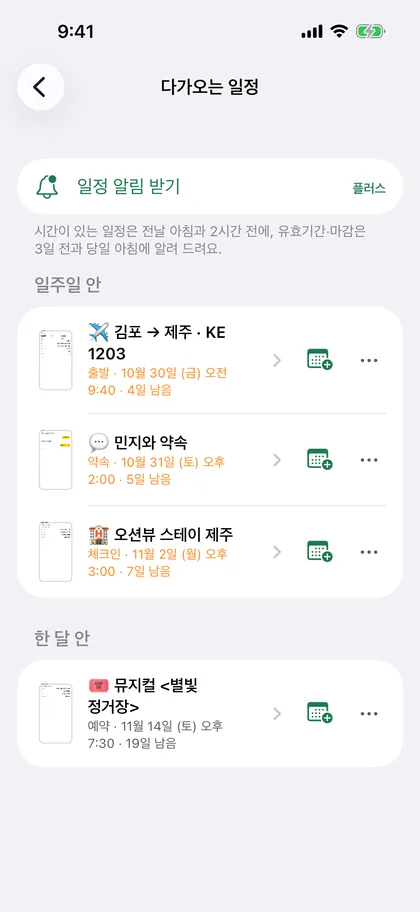
Screenshot Bin finds dates in boarding passes, hotel and ticket bookings, coupon expiry dates, and plans made in chats, then lists them as upcoming plans on the home screen.
- Flights are read in the departure airport’s time zone
- Sorted into this week, this month, and later
- Mark a plan as done and it leaves the list
What you can do
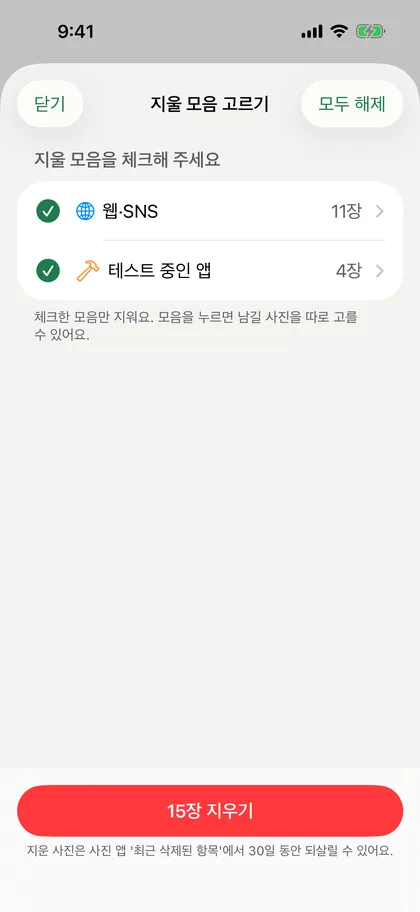
Clear out in one go
Check the groups you want to delete and remove them at once. Deleted photos stay in Recently Deleted in the Photos app for 30 days.
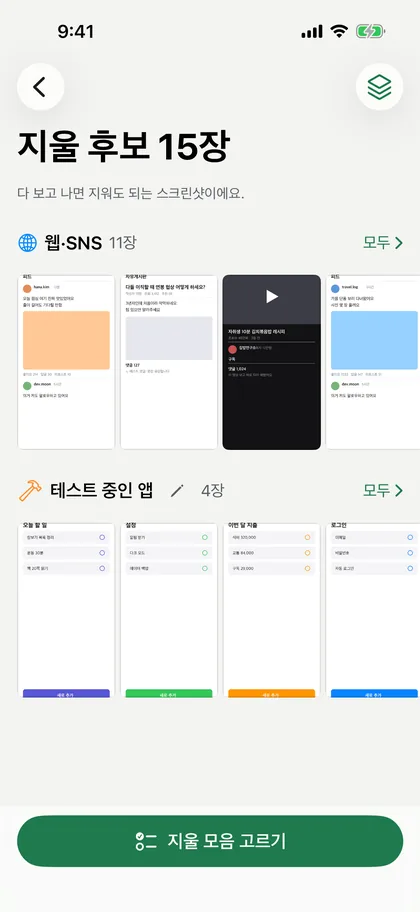
Group screens you take often
Gather screenshots of the same app into one group and delete them together. Words that often appear in unsorted photos are offered as group ideas.
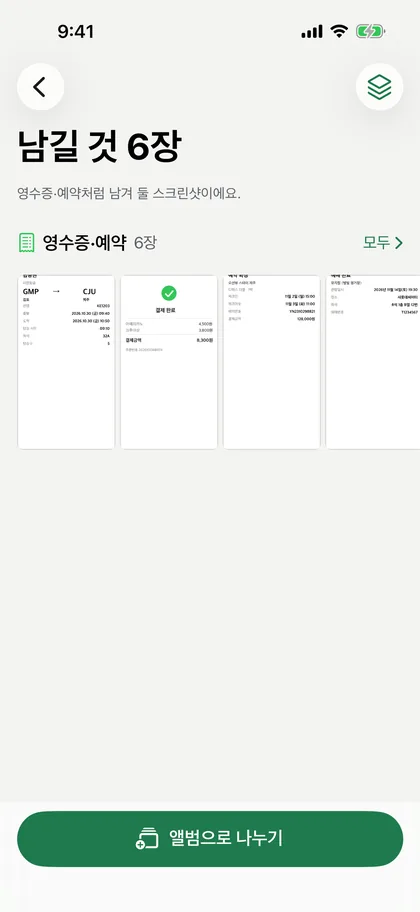
Keep what matters
Receipts, payments and bookings go to the keep bin. Move them into albums in the Photos app whenever you like.
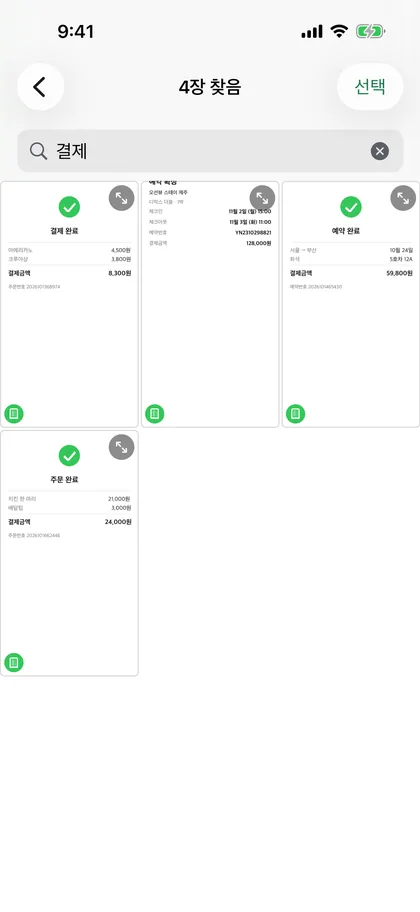
Find by the words inside
Search your screenshots by the text in them, like “payment” or “address”.
- A home screen widget shows how full each bin is.
- Move a photo that was sorted wrong and the app remembers it.
Actual app screens. The screenshots and plans inside are demo examples.
Screenshot Bin Plus
Buy once, use it for good. Sorting, deleting, search and upcoming plans stay free.
Add to Calendar
Add a captured flight, stay or plan to your calendar with one tap. You check the date in the iOS calendar sheet before it is saved.
Plan reminders
Get a reminder the morning before and 2 hours before. Expiry dates and deadlines are reminded 3 days before and on the morning of the day.
Bigger widgets
See all three bins on a medium home screen widget and on the Lock Screen.
Payment is handled by Apple. Screenshot Bin never receives your payment details.
Everything stays on your iPhone
- Text recognition, sorting and finding dates happen on your iPhone. Photos and text are never sent over the internet.
- No sign-up, no ads, and no analytics tools.
- The App Store privacy label says the app collects no data.
Questions
Do my photos leave my phone?
No. Text recognition (iOS Vision), sorting and finding dates all run on your iPhone, and the app sends no information over the internet.
What if I delete something by mistake?
iOS asks you to confirm before anything is deleted. Deleted photos stay in Recently Deleted in the Photos app for 30 days, so you can restore them.
Is it free?
Yes. Sorting, deleting, search, upcoming plans and the small widget are free, with no ads. Screenshot Bin Plus (calendar, reminders, bigger widgets) is a one-time purchase, not a subscription.
How does it choose what goes in “likely to delete”?
It reads the text on each screen. Community, social, YouTube and blog screens, test app screens, and groups you marked as “OK to delete” go there. Receipts and bookings are kept, and anything that fits nowhere stays unsorted and is never deleted.
Does it find every plan?
Not always. It looks for labels like departure, check-in or expiry date next to a date, and for day-and-time plans in chats. Always check the date before adding it to your calendar.
Clear out your screenshots today.
Download on the App Store